How to use ShowBuz

Step-by-step instructions for the iPhone app. Deps on Android can answer on WhatsApp; that still updates the diary.

Chair-Holders

Settings

Add a show to the diary

  1. Open Settings (bottom right).
  2. Add show.
  3. Type or search the show name. The published schedule fills the diary.
  4. Open Diary to see the dates.

Diary

Read a night

  1. Open Diary (bottom left).
  2. Choose Day, Week, Month, Year or List view along the top.
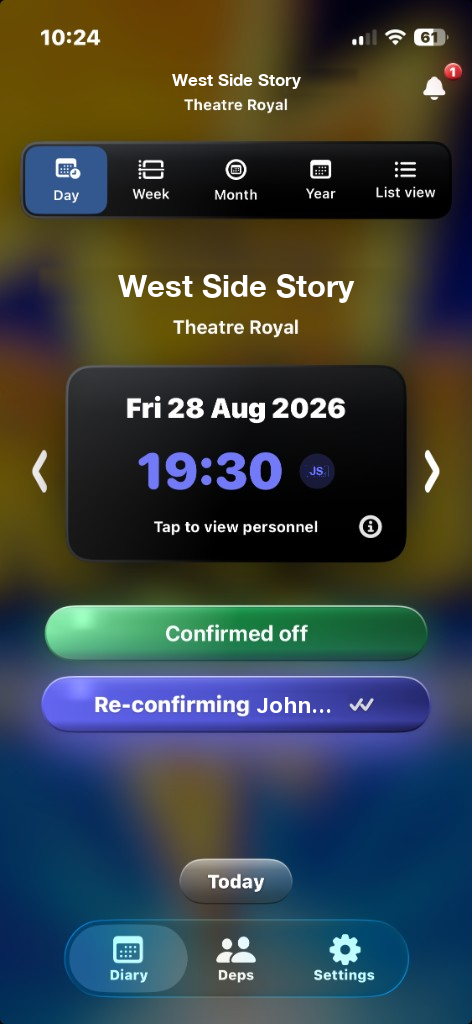
  3. Day view shows the date and curtain time. Tap to view personnel is on the night.
  4. The night also shows its status. This screen shows Confirmed off and Re-confirming John.
ShowBuz Day view. West Side Story at Theatre Royal. Friday 28 August 2026, 19:30. Confirmed off and Re-confirming John. Views: Day, Week, Month, Year, List view. Tabs: Diary, Deps, Settings.
Day view in Diary. Views along the top: Day, Week, Month, Year, List view. This night shows Confirmed off and Re-confirming John. Bottom tabs: Diary, Deps, Settings.

Diary

Ask a dep to cover

  1. Open Diary.
  2. Open the night that needs covering.
  3. Pick a dep.
  4. The app sends the request. They tap yes in the app or in the message. The response lands in the diary.

Diary

Use Auto Book

  1. Open the night in Diary.
  2. Start Auto Book.
  3. Auto Book works down your dep list until the dates are filled.

Diary

When they tap Available

  1. They tap Available in the app, or on WhatsApp. They do not have to download ShowBuz.
  2. On WhatsApp they can also tap Unavailable.
  3. The answer shows up in both diaries.

Diary

Auto reconfirm on the day of the show

  1. At 9:00am on the day of the show, Auto reconfirm sends a confirmation request.
  2. One tap covers both shows that day.
  3. Day view can show a Re-confirming row on the night, for example Re-confirming John.
ShowBuz Day view. West Side Story at Theatre Royal. Friday 28 August 2026, 19:30. Confirmed off and Re-confirming John. Views: Day, Week, Month, Year, List view. Tabs: Diary, Deps, Settings.
Day view showing Re-confirming John on the night, with Confirmed off above it.

Deps

The Deps tab

  1. Open Deps (middle of the bottom bar).
  2. This is your list of deps.

Deps

WhatsApp

Answer without installing the app

  1. You do not have to download ShowBuz. WhatsApp is enough.
  2. Tap Available or Unavailable on the WhatsApp message.
  3. The chair opens Diary and can see the night is covered.

ShowBuz

Answer in the app

  1. Open ShowBuz. Requests from chairs are in one list.
  2. Tap Available.
  3. You can see what is already booked.

Same login

If you also hold a chair

  1. Same login. Same app.
  2. Add your own show in Settings. The dates are in Diary.
ShowBuz Day view. West Side Story at Theatre Royal. Friday 28 August 2026, 19:30. Confirmed off and Re-confirming John. Views: Day, Week, Month, Year, List view. Tabs: Diary, Deps, Settings.
Diary is the left tab. Deps is the middle tab. Settings is the right tab.

Questions: admin@showbuz.app